Best Graphing Calculators for High School: 8 Picks in 2026

High school mathematics changes quickly. A calculator that handles Algebra II notation may feel perfectly adequate in September, then seem limiting once graphing, statistics, regression, or introductory calculus enters the schedule. That is why buyers searching for the best graphing calculators for high school should begin with course requirements rather than screen color or a long feature list. Graph plotting, readable mathematical notation, useful statistics tools, battery design, and a teacher’s preferred model all matter more than a flashy specification on a product page.
The biggest mistake is buying a non-graphing scientific calculator for a class that expects students to examine functions visually. The TI-30XIIS, SC-216, and TI-30XS MultiView can handle scientific calculations, fractions, trigonometry, or tables, but the supplied product information does not establish true graph plotting for those models. Another mistake is assuming that every advanced calculator fits every high school course. A CAS model may be excessive for Algebra II, while a basic graphing model may feel restrictive for a student moving toward calculus, statistics, or programming.
For most high school students, the Texas Instruments TI-84 Plus CE is the safest overall fit in this group because its color graphing, MathPrint notation, rechargeable battery, and included online calculator subscription cover common classroom tasks without adding the specialized complexity of a CAS machine. Students with different priorities have strong alternatives, including the streamlined TI-84 Evo, the budget-oriented CATIGA models, the Python-capable Casio options, and advanced CAS calculators for courses where symbolic mathematics is explicitly permitted.
Quick Answer
- Best Overall: Texas Instruments TI-84 Plus CE Color Graphing Calculator for broad high school graphing and textbook-style notation.
- Best for Streamlined Navigation: TI-84 Evo Graphing Calculator for its icon-based home screen, larger buttons, and expanded graphing space.
- Best for Python and 3D Graphing: Casio Prizm FX-CG50 Color Graphing Calculator for MicroPython support and listed 3D graphing.
- Best Advanced Option: HP Prime G2 Graphing Calculator for CAS, multi-touch interaction, and symbolic, graphical, and numerical views.
Best Graphing Calculators for High School Comparison Table
| Product | Best For | Graphing Features | Special Capability |
|---|---|---|---|
| TI-84 Plus CE | General high school coursework | Color graphing | MathPrint, rechargeable battery |
| TI-84 Evo | Streamlined classroom navigation | Larger graphing area | Icon-based home screen |
| CATIGA CS-121 | Budget-conscious graphing | Plots and analyzes graphs | 360+ functions |
| Casio Prizm FX-CG50 | Visual graphing and 3D work | Color and 3D graphing | MicroPython |
| CATIGA CS-229 | Compact graphing and exam prep | Plots and analyzes graphs | 360+ functions |
| TI-Nspire CX II CAS | Advanced symbolic mathematics | Color graphing | CAS and student software |
| HP Prime G2 | CAS and touch interaction | Advanced graphing | Multi-touch color display |
| Casio fx-9750GIII | Python and statistics coursework | Graph plotting | MicroPython, distributions, spreadsheets |
The individual reviews below put each model in its proper high school context, including the trade-offs that may matter as courses become more demanding.
1. Texas Instruments TI-84 Plus CE Color Graphing Calculator — Best Overall

The TI-84 Plus CE is the broadest match for a typical high school path that moves through Algebra II, precalculus, statistics, and possibly introductory calculus. Its color graphing makes separate functions easier to distinguish visually, while MathPrint presents fractions, formulas, and mathematical symbols in a format that resembles textbook work. That combination matters during a homework problem where the student needs to check whether an expression was entered correctly, rather than merely stare at a string of calculator syntax.
The rechargeable battery is listed as lasting up to one month on a single charge, although actual runtime depends on use. The product also includes a four-year subscription for the TI-84 Plus CE online calculator, which may be useful when assignments shift between a physical calculator and a computer. Its main advantage is balance. It offers more graphing capability than a scientific calculator without moving into the denser CAS environment of the TI-Nspire or HP Prime.
Pros
- Color graphing helps separate multiple plotted functions.
- MathPrint displays stacked fractions and mathematical notation in textbook-style form.
- Rechargeable battery is listed with runtime of up to one month per charge.
- Includes a four-year TI-84 Plus CE online calculator subscription.
- Supports a broad range of high school math and science work according to the product information.
Cons
- The product information does not identify CAS functionality.
- Students seeking Python or MicroPython support should look at the Casio models instead.
This model makes the most sense for families seeking one graphing calculator that can follow a student through several high school courses. A different choice may fit better if the teacher requires a specific newer interface, Python programming, or symbolic CAS work. For general graphing, readable entry, and day-to-day school use, its trade-off is sensible rather than flashy.
To buy this product, click here.
2. TI-84 Evo Graphing Calculator — Best for Streamlined Navigation

The TI-84 Evo takes the familiar TI-84 idea in a more interface-focused direction. Its icon-based home screen places popular math tools where they are easier to locate, and its simplified keypad uses larger buttons with less visual clutter. For a student who loses time hunting through menus, that layout may matter as much as raw mathematical capability. The supplied information also describes a processor that delivers three times faster performance and a graphing area that is 50 percent larger, though those are product claims rather than independent test results.
That larger graphing area could be helpful when a student is comparing curves or trying to see a relationship without repeatedly changing the viewing window. The white version reviewed here should not be confused with a separate functional recommendation for the lavender listing. The supplied specifications describe the two TI-84 Evo listings with the same core features, so color does not justify separate rankings.
Pros
- Icon-based home screen puts common tools near the front of the interface.
- Larger buttons and reduced keypad clutter may reduce navigation steps.
- Product information claims three times faster performance.
- Product information claims 50 percent more graphing space.
- Built for everyday classroom use according to the listing.
Cons
- The product information does not clearly identify battery type or runtime.
- CAS, Python, and detailed statistical functions are not specified in the supplied information.
Students who want a current-feeling TI-84 workflow with a cleaner interface should look closely at this model. The TI-84 Plus CE remains the safer pick for buyers who specifically want confirmed color graphing, MathPrint, and rechargeable-battery details from the listing. The Evo’s central advantage is its interface and graphing-space claim, not a confirmed specialized mathematics environment.
To buy this product, click here.
3. CATIGA CS-121 Scientific and Graphing Calculator — Best Budget-Oriented Option

The CATIGA CS-121 aims at students who need genuine graphing without moving straight to a higher-priced advanced calculator. The supplied description says it can plot functions, analyze graphs, solve complex equations, and show a graph alongside the formula. That last point is especially useful during algebra or trigonometry practice because the student can connect the entered equation with its visual result on the same screen.
Its listed 360-plus functions include fractions, complex numbers, statistics, linear regression, standard deviation, and variable solving. Those features give the CS-121 a wider mathematical menu than a basic scientific calculator, while the stated 7 by 3.3-inch body and 6.4-ounce weight point toward a compact form. The included protective case and stated 365-day limited warranty add practical value, but the listing does not provide the detailed graphing modes or battery system a buyer might want to compare with a TI model.
Pros
- Supports function plotting and graph analysis.
- Displays graphs and formulas together according to the product description.
- Lists more than 360 functions, including regression and standard deviation.
- Includes support for complex numbers and variable solving.
- Product information lists a protective case and 365-day limited warranty.
Cons
- Detailed display specifications and battery information are not clearly supplied.
- Teacher compatibility and exam-policy status are not established by the product information.
The CS-121 fits a student who wants graphing, statistics, and equation tools at a lower outlay than the premium models. A TI-84 or Casio may be easier to match with a teacher’s existing instructions if a class uses model-specific steps. The key trade-off is breadth at a lower entry point versus less clearly documented ecosystem support.
To buy this product, click here.
4. Casio Prizm FX-CG50 Color Graphing Calculator — Best for Visual and 3D Graphing

The Casio Prizm FX-CG50 is the most visually expansive option in this selection. Its listed color display supports 3D graphing for up to three functions, including examples such as spheres, cylinders, and planes. That makes it especially interesting for students whose coursework or curiosity reaches beyond ordinary two-dimensional function plots. Color can also help separate several graphs, although color itself does not prove greater mathematical capability.
The calculator lists complex numbers, polar and rectangular graphing, dynamic graphing, statistics, and geometry. Natural Textbook Display presents expressions and results in a familiar mathematical format, while MicroPython support opens a programming path that is absent from the TI-84 listings here. The product information also makes exam-related claims, but official policies can change and must be checked for the exact model before test day.
Pros
- Supports color graphing and listed 3D graphing functions.
- Includes polar and rectangular graphing options.
- Lists dynamic graphing, statistics, geometry, and complex-number functions.
- Supports MicroPython programming.
- Natural Textbook Display presents expressions and results in textbook-style notation.
Cons
- MicroPython should not be treated as equivalent to full desktop Python or its libraries.
- Exact current exam eligibility should be verified with the relevant organization.
This model suits a student who wants visual variety, 3D examples, or a path into handheld programming. The TI-84 Plus CE may be a simpler general classroom choice for students following common TI instructions. The FX-CG50 asks buyers to value its broader visual and programming features rather than choosing it solely for a color screen.
To buy this product, click here.
5. CATIGA CS-229 Scientific and Graphing Calculator — Best Compact Alternative

The CATIGA CS-229 has a very similar feature profile to the CS-121, so buyers should compare the exact listing and classroom expectations rather than assume a major mathematical difference. Its description confirms graph plotting, graph analysis, and simultaneous display of graphs and formulas. That arrangement can help a student connect a symbolic entry with a visible curve during algebra, calculus preparation, or exam review.
The CS-229 lists more than 360 functions, including fractions, complex numbers, statistics, linear regression, standard deviation, and variable solving. Its stated 7 by 3.3-inch dimensions, protective case, and anti-drop body emphasize portability. The supplied information does not clearly establish a meaningful performance difference from the CS-121, so this model is best treated as an alternative listing within the same general CATIGA approach, not as a dramatic upgrade.
Pros
- Supports graph plotting and graph analysis.
- Shows graphs and formulas simultaneously according to the listing.
- Lists more than 360 functions for algebra, geometry, trigonometry, and advanced work.
- Includes linear regression, standard deviation, and complex-number tools.
- Includes a protective case and stated 365-day limited warranty.
Cons
- The supplied details do not establish a clear functional advantage over the CATIGA CS-121.
- Battery, display, and teacher-specific compatibility details are not clearly specified.
The CS-229 is worth considering if its particular listing, availability, or packaging suits the buyer better than the CS-121. Students who want a more established calculator ecosystem may prefer TI or Casio. Its appeal rests on compact graphing and a broad function list, with the caveat that the two CATIGA models overlap heavily in the supplied specifications.
To buy this product, click here.
6. Texas Instruments TI-Nspire CX II CAS — Best for Advanced Symbolic Mathematics

The TI-Nspire CX II CAS belongs in a different tier from ordinary graphing calculators because CAS is explicitly identified in the product name. That distinction matters for high school students taking advanced mathematics, but it should not be mistaken for an automatic advantage in every class. A teacher may prefer a simpler non-CAS workflow, and examination rules can treat calculator types differently.
The supplied information lists a 3.5-inch color screen, six graph styles, 15 graph colors, a rechargeable battery, and included TI-Nspire CX Student Software. Its touchpad navigation and quick alpha keys are intended for a more computer-like handheld experience. The battery is listed as lasting up to two weeks on a charge, but runtime is a stated claim rather than a guarantee. Students should confirm that the CAS capability fits their course and current rules before choosing it.
Pros
- CAS is explicitly identified in the product name.
- Includes a color screen with six graph styles and 15 graph colors.
- Includes a rechargeable battery.
- Bundled TI-Nspire CX Student Software supports computer-based work.
- Product information lists touchpad navigation and quick alpha keys.
Cons
- CAS may be unnecessary or restricted in some high school courses or assessments.
- The listed two-week battery runtime is shorter than the TI-84 Plus CE claim.
This calculator is for students whose high school program genuinely uses symbolic mathematics and advanced graphing workflows. For routine Algebra II or precalculus, the TI-84 Plus CE or TI-84 Evo may involve less complexity. Its central trade-off is a richer mathematical environment paired with a greater need to confirm teacher and assessment requirements.
To buy this product, click here.
7. HP Prime G2 Graphing Calculator — Best for Touch and CAS Work
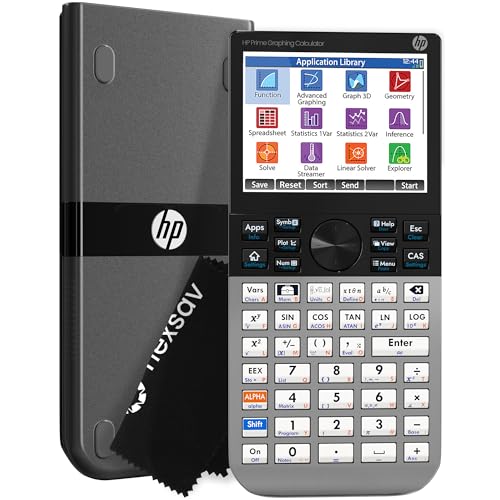
The HP Prime G2 offers another clearly advanced route for high school students who need CAS and prefer a touch-oriented interface. The supplied information identifies a 3.5-inch multi-touch color display with pinch-to-zoom and interactive graph manipulation. It also lists symbolic, graphical, and numerical views, dynamic geometry, spreadsheet applications, and RPN. Those tools point toward a calculator intended for students working across several forms of mathematical representation.
Wireless and app integration are also described, including the HP Prime Mobile App and optional connectivity kits. The calculator has a rechargeable lithium-ion battery and 256 MB of flash memory according to the product information. Those details may appeal to a student or school using connected demonstrations, but they also add capabilities that a typical Algebra II student may never need. The product title includes exam claims, yet current eligibility should be confirmed independently for the exact model.
Pros
- CAS is explicitly supported by the product information.
- Multi-touch display supports pinch-to-zoom and interactive graph manipulation.
- Provides symbolic, graphical, and numerical views.
- Lists dynamic geometry, spreadsheets, and RPN.
- Includes rechargeable lithium-ion battery and 256 MB flash memory according to the listing.
Cons
- Its CAS and touch features may exceed the needs of standard high school classes.
- Optional connectivity kits are referenced, so the full connected setup may require additional equipment.
The HP Prime G2 suits advanced students who want a touch interface and a broad CAS environment rather than a conventional keypad-first calculator. Students following a teacher’s TI-84 procedures may face a different workflow. Its defining trade-off is advanced flexibility versus the need to verify course fit, instruction compatibility, and current assessment rules.
To buy this product, click here.
8. Casio fx-9750GIII Graphing Calculator — Best for Python and Statistics Features

The Casio fx-9750GIII gives high school students a graphing platform with a specific emphasis on programming and statistics. The supplied information lists graph plotting, vectors, probability distributions, spreadsheets, eActivities, and integrals, covering several tasks that can appear as coursework becomes more varied. Natural Textbook Display keeps expressions and results visually familiar, which can reduce the distance between a written worksheet and calculator input.
MicroPython integration is the clearest differentiator. Students can program with MicroPython on the calculator or transfer files through the included USB cable. USB file transfer should not be confused with wireless connectivity or charging, and MicroPython should not be treated as full desktop Python. The product information also makes exam-related claims, but current rules must be checked for the exact model rather than assumed from the listing.
Pros
- Supports graph plotting and listed vector functions.
- Includes probability distributions and spreadsheet tools.
- Supports MicroPython programming.
- Natural Textbook Display shows expressions and results in textbook-style notation.
- USB connectivity supports storing and transferring files according to the listing.
Cons
- MicroPython does not establish support for all desktop Python libraries or packages.
- The product information does not identify CAS functionality.
This model fits a student who wants graphing plus probability, spreadsheets, and a path into handheld MicroPython. A color and 3D-focused student may prefer the FX-CG50, while a student whose teacher demonstrates TI-84 procedures may value the TI ecosystem more. The fx-9750GIII’s appeal comes from its programming and statistics tools rather than a confirmed CAS environment.
To buy this product, click here.
Buying Guide
Start With the Teacher’s Required Model
High school classes often teach calculator steps alongside mathematical ideas. A teacher may demonstrate a particular menu path, notation style, or graphing workflow, so a calculator with more features is not automatically easier for the class. Before buying, check the syllabus, classroom handouts, or school supply list for a required family or model.
Separate Graphing From Scientific Calculation
A scientific calculator can handle trigonometry, logarithms, fractions, and statistics without plotting functions. For this roundup, actual graphing capability is the dividing line. The TI-30XIIS, SC-216, and TI-30XS MultiView may be useful for non-graphing work, but the supplied information does not establish them as graphing calculators. A student assigned function plots or graphical comparisons needs a model that explicitly supports plotting.
Decide Whether CAS Belongs in the Course
CAS is explicitly identified for the TI-Nspire CX II CAS and HP Prime G2. That can matter for advanced symbolic mathematics, but it can also create a mismatch with classroom or assessment rules. A standard graphing model such as the TI-84 Plus CE may be a better fit for ordinary high school coursework. Confirm the teacher’s expectations before paying for advanced symbolic features.
Look at Programming With Precision
The Casio FX-CG50 and fx-9750GIII explicitly list MicroPython. That is meaningful for students interested in programming, yet MicroPython is a handheld environment and should not be treated as a promise of full desktop Python compatibility. USB file transfer on the fx-9750GIII also does not mean wireless communication or automatic charging.
Choose Visual Features for a Reason
Color can help separate several plotted functions, while the FX-CG50’s listed 3D graphing gives it a different visual role from ordinary two-dimensional graphing calculators. A larger graphing area, such as the one claimed for the TI-84 Evo, may help with viewing relationships. These features matter when they support the student’s coursework, not simply because they sound impressive.
Check Power and Portability
The TI-84 Plus CE and TI-Nspire CX II CAS list rechargeable batteries, while the HP Prime G2 lists a rechargeable lithium-ion battery. The TI-84 Plus CE listing gives a runtime claim of up to one month, and the TI-Nspire listing gives up to two weeks. Treat those figures as published estimates. For the CATIGA models, the supplied information emphasizes compact size and a protective case but does not clearly identify the battery system.
Best Graphing Calculators for High School FAQ
What Is the Best Graphing Calculator for Most High School Students?
The Texas Instruments TI-84 Plus CE is the strongest general fit among these products because it combines color graphing, MathPrint notation, a rechargeable battery, and an included online calculator subscription. It is less specialized than the CAS models and more capable for graphing than the listed scientific calculators.
Do High School Students Need a Graphing Calculator?
That depends on the course. Algebra II, precalculus, statistics, and calculus classes may use graphs, tables, regression, or function comparisons. A scientific calculator can handle many numerical operations, but it does not replace a model with confirmed graph plotting. Check the class requirements before buying.
Is a CAS Calculator Necessary for High School?
Usually, the need is course-specific rather than universal. The TI-Nspire CX II CAS and HP Prime G2 explicitly identify CAS, while the other reviewed graphing calculators do not. CAS may be useful in advanced mathematics, but the teacher or school may prefer a non-CAS model for instruction or assessments.
Which High School Graphing Calculator Supports Python?
The Casio Prizm FX-CG50 and Casio fx-9750GIII explicitly list MicroPython support. That does not establish compatibility with every desktop Python library, package, or project. Students should check the exact programming requirements before choosing either model.
Are Color Graphing Calculators Better?
Color can make multiple plotted functions easier to distinguish, but it does not automatically provide more mathematical capability. The TI-84 Plus CE, Casio Prizm FX-CG50, TI-Nspire CX II CAS, and HP Prime G2 list color-related display features. Choose color when it supports the student’s graphing workflow or visual learning preference.
Can a Scientific Calculator Replace a Graphing Calculator?
It can replace one for courses that require only numerical calculations, fractions, trigonometry, logarithms, or basic statistics. It cannot replace a graphing calculator for tasks that require actual plotted functions unless the scientific model explicitly provides that capability. The supplied information describes the TI-30XIIS, SC-216, and TI-30XS MultiView as scientific calculators rather than true graphing models.
Should Students Buy the Calculator Their Teacher Uses?
Matching the classroom model can make menu instructions and demonstrations easier to follow. It is especially useful when assignments give model-specific keystrokes. A different calculator may still work mathematically, but the student may need to translate every procedure independently.
Final Verdict
The Texas Instruments TI-84 Plus CE is the best overall fit for most high school students in this selection. It addresses the central needs of graphing coursework with color plots and MathPrint notation, while its rechargeable battery and included online calculator subscription add practical flexibility. It does not claim the advanced CAS environment of the TI-Nspire or HP Prime, which is a benefit for students who need a familiar graphing calculator rather than symbolic mathematics.
Several alternatives make sense for specific priorities. The TI-84 Evo emphasizes a cleaner interface and larger graphing area, the CATIGA CS-121 and CS-229 provide graphing with broad listed function sets, and the Casio FX-CG50 adds 3D graphing and MicroPython. The Casio fx-9750GIII is especially relevant for probability, spreadsheets, and MicroPython, while the TI-Nspire CX II CAS and HP Prime G2 belong with advanced courses that explicitly support CAS. The final decision should follow the student’s actual syllabus, teacher instructions, and current assessment rules for the exact model.