Best Graphing Calculator for AP Calculus: 9 Picks in 2026
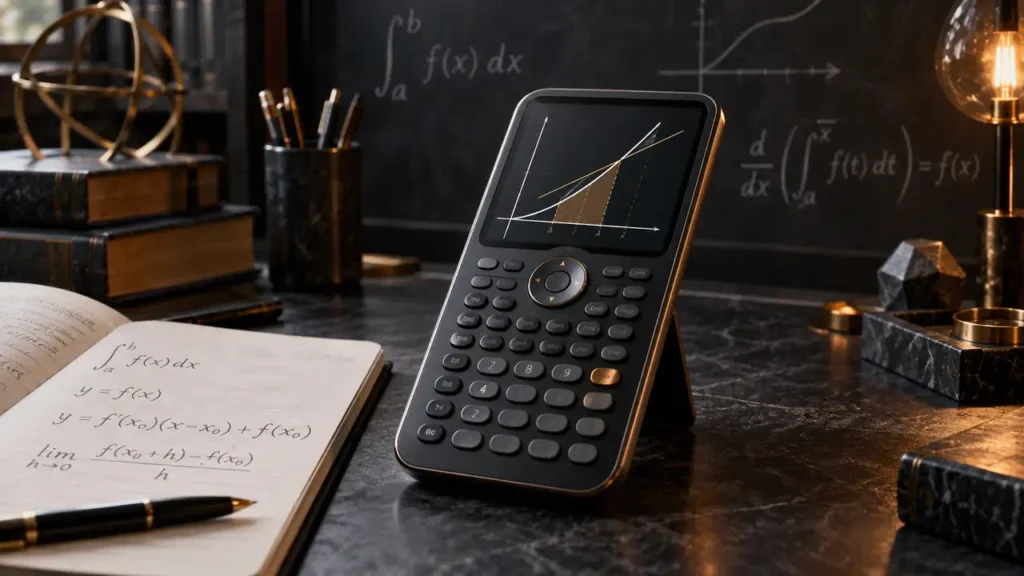
AP Calculus asks you to move between equations, tables, graphs, limits, derivatives, and integrals without losing the thread of the problem. A graphing calculator can help with that workflow, but the most expensive model is not automatically the most useful one. A student who mainly needs reliable function graphing may prefer a familiar TI-84 layout, while someone working with symbolic mathematics may need a CAS calculator instead.
Common buying mistakes include treating every graphing calculator as interchangeable, assuming a calculator’s exam status from a seller’s description, and paying for advanced tools that a course does not permit or require. For AP Calculus, pay close attention to graph visibility, mathematical notation, numerical calculus tools, interface, battery setup, and any teacher or exam rules that apply to the exact model. The TI-84 Evo is the strongest general recommendation here because its larger graphing area, simplified keypad, and icon-based navigation directly support routine classroom work.
There is still a good case for other models. The TI-Nspire CX II CAS and HP Prime G2 offer explicitly listed CAS capabilities, while the Casio fx-9750GIII adds MicroPython, probability tools, spreadsheets, and graphing at a lower price range. The TI-84 Plus CE remains appealing for color graphing and MathPrint notation, and the CATIGA CS-121 gives budget-minded buyers a compact way to explore graphing and calculus functions.
Quick Answer
- Best Overall: TI-84 Evo Graphing Calculator for everyday AP Calculus graphing and streamlined navigation.
- Best for CAS: Texas Instruments TI-Nspire CX II CAS for buyers who specifically need computer algebra features.
- Best Budget-Oriented Option: CATIGA CS-121 for graphing, equation work, and listed calculus functions at a lower price range.
- Best for Symbolic Mathematics: HP Prime G2 for its explicitly listed CAS, symbolic, graphical, and numerical views.
Best Graphing Calculator for AP Calculus Comparison Table
| Product | Best For | Graphing and Calculus Features | Display or Interface |
|---|---|---|---|
| TI-84 Evo | Everyday AP Calculus work | Larger graphing area, quicker calculations, graphing tools | Icon-based home screen, simplified keypad |
| TI-84 Plus CE | Color graphing and textbook-style notation | Graphing, MathPrint, split visual interpretation through color | Color display, rechargeable battery |
| CATIGA CS-121 | Budget-conscious buyers | Function plotting, graph analysis, equation solving, listed calculus functions | Formula and graph visible together |
| TI-Nspire CX II CAS | CAS-based calculus work | CAS, advanced graphing, multiple graph styles | 3.5-inch color screen, touchpad navigation |
| Casio fx-9750GIII | Graphing plus statistics and programming | Graphing, integrals, probability distributions, vectors, spreadsheets | Natural Textbook Display, keypad interface |
| TI-84 Plus Silver Edition | Traditional TI-84 workflow | Calculus functions, split graph and table view, 21 apps | Split-screen graph and table display |
| HP Prime G2 | CAS and interactive graphing | CAS, dynamic geometry, symbolic, graphical, and numerical views | 3.5-inch multitouch color display |
The reviews below explain which calculator fits numerical graphing, CAS work, statistics, programming, and budget-focused AP Calculus preparation.
1. TI-84 Evo Graphing Calculator Texas Instruments, White – Best Overall

AP Calculus often involves repeated graph adjustments. You may change a window, inspect a curve, trace a point, and return to an equation several times in one problem. The TI-84 Evo addresses that rhythm with a larger graphing area, a simplified keypad, and an icon-based home screen that places common math tools closer to the surface.
The supplied information also describes a processor that delivers calculations and graphing three times faster than the previous TI-84 series reference point. That claim is manufacturer or listing information rather than an independent test result, but it identifies the model’s intended advantage: less friction during routine graphing. The white finish is cosmetic, so the recommendation rests on the shared TI-84 Evo design rather than appearance.
Pros
- 50% more graphing space is listed for viewing curves and relationships.
- Icon-based home screen puts common math tools in prominent locations.
- Simplified keypad has larger buttons and less visual clutter.
- Product information identifies faster calculations and smoother graphing.
- Built for everyday classroom use.
Cons
- CAS functionality is not identified in the supplied information.
- The listing does not clearly specify the battery system or runtime.
This model makes the most sense for AP Calculus students who want a conventional graphing workflow with a clearer graphing area and less menu hunting. Students specifically seeking symbolic algebra should look at the TI-Nspire CX II CAS or HP Prime G2 instead. For numerical graphing and everyday course exercises, the Evo offers the most balanced feature set in this group.
To buy this product, click here.
2. Texas Instruments TI-84 Plus CE Color Graphing Calculator, Black – Best for Color Graphing

Color is useful in a calculus problem with several functions on screen. A student can distinguish a parent function, transformation, derivative-related curve, or comparison graph more readily when the lines are visually separated. The TI-84 Plus CE combines that color display with MathPrint, which presents fractions, formulas, and mathematical symbols in a textbook-style layout.
The rechargeable battery is listed as lasting up to one month on a single charge. That is a published maximum rather than a guarantee, but it makes the model attractive for students who prefer a rechargeable design. The included four-year subscription to the TI-84 Plus CE online calculator adds a software component, although classroom or exam rules may limit which tools can be used in a particular setting.
Pros
- Color graphing can help separate multiple plotted functions.
- MathPrint displays stacked fractions and formulas in textbook-style notation.
- Rechargeable battery is listed with up to one month of runtime per charge.
- Four-year online calculator subscription is included according to the listing.
- Lightweight design is described as suitable for classroom use.
Cons
- CAS functionality is not identified in the supplied product information.
- The extra online software does not replace checking rules for the exact AP Calculus setting.
The TI-84 Plus CE suits students who learn visually and care about textbook-style input. It may be less appropriate for someone who wants symbolic calculus or a touch interface. Choose it over the TI-84 Evo when color and MathPrint matter more than the Evo’s listed graphing-area and navigation changes.
To buy this product, click here.
3. CATIGA CS-121 – Best Budget-Oriented Option

The CATIGA CS-121 takes a different route than the larger TI and HP models. Its product information describes a scientific calculator and graphing calculator combined in one compact body, with the graph and formula visible together. That pairing can be useful while checking whether an entered function matches the curve you expected.
Its listed 360-plus functions include fractions, complex numbers, statistics, linear regression, standard deviation, and variable solving. The description also names algebra, trigonometry, calculus, and statistics as intended subjects. For a student trying to add graphing capability without moving immediately to a premium calculator, that breadth is appealing, though the listing does not detail every graphing mode or identify CAS functionality.
Pros
- Lists function plotting and graph analysis.
- Can show a graph and formula together according to the product description.
- Includes more than 360 listed functions.
- Supports listed statistics, regression, standard deviation, and variable-solving tools.
- Compact body and included protective case are described in the listing.
Cons
- Detailed graphing modes are not clearly specified.
- CAS functionality is not identified.
The CS-121 is a sensible fit for a buyer focused on basic graphing, equation work, and broad numerical functions at a lower price range. Students whose teacher demonstrates a specific TI workflow may prefer a TI model, while students requiring confirmed symbolic tools should move up to a CAS calculator. Its central trade-off is breadth at a lower cost versus less clearly documented advanced graphing detail.
To buy this product, click here.
4. Texas Instruments TI-Nspire CX II CAS Color Graphing Calculator – Best for CAS

The major distinction here is explicit CAS labeling. That matters for calculus buyers who want a calculator built around computer algebra rather than ordinary numerical graphing alone. The supplied information also identifies enhanced graphing capabilities through the included TI-Nspire CX Student Software, giving the calculator a broader software-connected workflow than a traditional TI-84 listing.
Its 3.5-inch color screen, six graph styles, and 15 colors can help separate several curves during visual analysis. The touchpad and quick alpha keys provide a different interaction style from the familiar TI-84 keypad. The listing states that the rechargeable battery can last up to two weeks per charge, so buyers should weigh that published runtime against their own charging habits.
Pros
- CAS is explicitly identified in the product name.
- Includes TI-Nspire CX Student Software according to the listing.
- 3.5-inch color screen is specified.
- Six graph styles and 15 colors are listed.
- Rechargeable battery with up to two weeks of stated runtime.
Cons
- CAS features may be unnecessary for a course centered on routine numerical graphing.
- Touchpad navigation differs from the keypad workflow of TI-84 models.
Students who specifically need CAS should place this model near the top of their list, subject to teacher and exam rules. A TI-84 Evo or TI-84 Plus CE may be easier to justify for ordinary graphing practice, while the TI-Nspire’s software and CAS environment add capability that some AP Calculus assignments may not require.
To buy this product, click here.
5. Casio fx-9750GIII Graphing Calculator – Best for MicroPython and Statistics

The Casio fx-9750GIII brings several useful side paths to AP Calculus. Its Natural Textbook Display presents expressions and results in a textbook-style format, while the listed tools include graph plotting, vectors, probability distributions, spreadsheets, eActivities, and integrals. That combination can help a student who expects calculus to overlap with statistics or broader STEM coursework.
MicroPython support is explicitly listed, but MicroPython should not be treated as a full desktop Python environment. The included USB cable is described for transferring files to and from a computer, which adds practical flexibility for programming and stored work. The product listing also makes exam-related claims, yet current rules should always be checked for the exact model and test administration.
Pros
- Natural Textbook Display shows expressions in textbook-style notation.
- Graph plotting and integrals are listed features.
- Supports probability distributions, spreadsheets, vectors, and eActivities.
- MicroPython programming is explicitly supported.
- USB file transfer to and from a computer is described.
Cons
- CAS functionality is not identified.
- MicroPython should not be assumed to support every desktop Python library or workflow.
This model fits students who want graphing plus statistics and programming tools without moving into a CAS calculator. The TI-Nspire CX II CAS or HP Prime G2 is a better match for explicitly listed symbolic mathematics. Prefer the Casio when MicroPython, probability tools, or spreadsheet work carry real weight in your broader coursework.
To buy this product, click here.
6. Texas Instruments TI-84 Plus Silver Edition – Best for Split Graph and Table Work

A graph alone can hide useful numerical information. The TI-84 Plus Silver Edition is listed with a split-screen view that lets users trace a graph while scrolling through table values. For AP Calculus work involving function behavior, approximate values, and changes across an interval, that paired view can keep the curve and its numbers connected.
The calculator also lists calculus, engineering, trigonometric, and financial functions, along with 21 preloaded apps. USB on-the-go technology is described for file sharing with other calculators and connection to PCs. The supplied information does not identify a color display, CAS, or rechargeable battery, so its appeal is primarily the established graph-and-table workflow and listed app support.
Pros
- Split-screen graph and table view is explicitly listed.
- Calculus and trigonometric functions are identified.
- Includes 21 preloaded apps.
- USB on-the-go technology supports listed file-sharing uses.
- One-year warranty is supplied in the product information.
Cons
- CAS functionality is not identified.
- The product information does not clearly specify a rechargeable battery.
The Silver Edition is a practical pick for students who like seeing numerical table values beside a plotted curve and do not need CAS. The TI-84 Evo offers a newer interface direction, while the TI-84 Plus CE adds color and MathPrint. This model remains relevant for buyers who value its stated split-screen workflow and preloaded apps.
To buy this product, click here.
7. HP Prime G2 Graphing Calculator – Best for Symbolic Mathematics
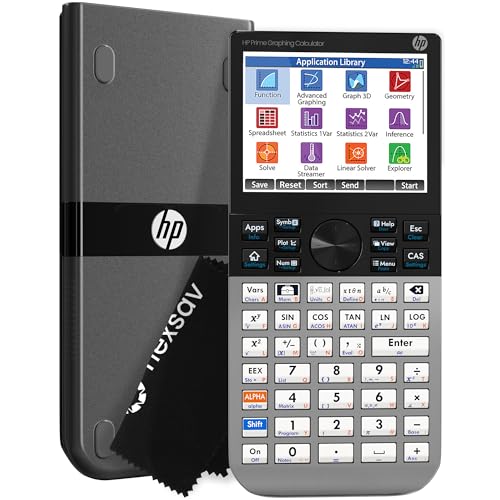
The HP Prime G2 is the other model here with explicitly listed CAS capability. Its product information describes symbolic, graphical, and numerical views, plus dynamic geometry and spreadsheet applications. For a calculus student who wants to move between an expression, a graph, and numerical results on one device, that range is the central attraction.
The 3.5-inch multitouch color display supports pinch-to-zoom and interactive graph manipulation according to the listing. A rechargeable lithium-ion battery, 256 MB of flash memory, and optional wireless and app integration are also identified. Those features create a broad environment, but they may be more than a student needs for straightforward AP Calculus graphing, and current exam policies must be verified separately.
Pros
- CAS is explicitly listed.
- Supports symbolic, graphical, and numerical views.
- Multitouch color display supports listed graph manipulation features.
- Dynamic geometry and spreadsheet applications are identified.
- Rechargeable lithium-ion battery and 256 MB flash memory are listed.
Cons
- Its advanced CAS environment may exceed the needs of routine numerical AP Calculus work.
- Wireless connectivity requires optional kits according to the product information.
The HP Prime G2 is best for students who have a clear reason to use CAS and interactive graphing. A TI-84 model may be more familiar for conventional classroom exercises, while the TI-Nspire CX II CAS offers another CAS-based route. Choose the HP Prime G2 for its explicitly described combination of symbolic, graphical, and numerical work.
To buy this product, click here.
Buying Guide
Start With the Course Rules
AP Calculus assignments, classroom instruction, and exams may apply different calculator rules. Product capability does not establish official eligibility. Check the current requirements for the exact model before relying on it for test day, especially with CAS calculators such as the TI-Nspire CX II CAS and HP Prime G2.
Numerical Graphing or CAS?
A standard graphing calculator can support plotting, tables, and numerical exploration. CAS is a separate capability. The TI-Nspire CX II CAS and HP Prime G2 explicitly identify CAS, while the other listings here do not. Pay for CAS only if your course rules and study habits give you a clear reason to use symbolic tools.
Look at How Curves Are Displayed
The TI-84 Evo lists 50% more graphing space, the TI-84 Plus CE uses color, and the TI-Nspire and HP Prime identify color displays with additional visual controls. These differences affect how several functions appear together, but color or a larger screen does not automatically make a calculator mathematically more capable.
Keep Tables in the Workflow
AP Calculus often connects a function’s formula with values across an interval. The TI-84 Plus Silver Edition explicitly lists a split graph-and-table display, while the CATIGA CS-121 describes simultaneous formula and graph viewing. Those features may matter more than a long list of less relevant functions.
Check Statistics and Programming Needs
The Casio fx-9750GIII lists probability distributions, spreadsheets, and MicroPython. The CATIGA CS-121 lists regression and standard deviation. These tools can be useful if your mathematics path includes statistics or programming, but they should not be mistaken for CAS.
Account for Power and Software
The TI-84 Plus CE and TI-Nspire CX II CAS list rechargeable batteries, while the HP Prime G2 lists a rechargeable lithium-ion battery. The TI-Nspire includes student software, and the TI-84 Plus CE includes a four-year online calculator subscription according to the product information. Check what your school permits before treating software access as part of your exam setup.
Best Graphing Calculator for AP Calculus FAQ
Is the TI-84 Evo a good choice for AP Calculus?
It is the strongest general fit in this selection because the listing identifies a larger graphing area, simplified keypad, icon-based navigation, and faster calculations. It does not have CAS functionality identified in the supplied information.
Do I need a CAS calculator for AP Calculus?
Not every student needs one. CAS can be useful for symbolic work, but course and exam rules may limit its use. The TI-Nspire CX II CAS and HP Prime G2 explicitly list CAS, while the other reviewed models do not.
Is the TI-84 Plus CE better than the TI-84 Evo?
They emphasize different benefits. The TI-84 Plus CE lists color graphing, MathPrint, and a rechargeable battery. The TI-84 Evo lists a larger graphing area, simplified keypad, icon-based navigation, and faster calculations. Choose based on which workflow your class uses and which features you will actually use.
Can the Casio fx-9750GIII help with calculus?
Yes. Its product information lists graph plotting and integrals, along with textbook-style display, vectors, spreadsheets, and probability distributions. The listing does not identify CAS, so do not treat its calculus tools as confirmed symbolic calculus.
Is the CATIGA CS-121 a real graphing calculator?
The supplied product description explicitly says it can plot functions, analyze graphs, and show a graph with its formula. It also lists equation solving and calculus among its intended uses. Detailed graphing modes are not clearly specified.
Does a color screen improve calculus performance?
Color can make multiple plotted functions easier to distinguish, particularly on the TI-84 Plus CE, TI-Nspire CX II CAS, and HP Prime G2. It does not by itself add mathematical capability or confirm CAS.
Should I buy based on an exam-approval claim?
No. The product information includes exam-related claims for some models, but current rules can change and may depend on the exact test. Confirm the current policy with the organization administering the exam.
Final Verdict
The TI-84 Evo is the best overall graphing calculator for AP Calculus in this selection because its listed improvements target the work students repeat most often: opening common tools, reading graphs, entering expressions, and moving through calculations. Its larger graphing area and simplified keypad make it a practical numerical calculator, while its position in the TI-84 line may suit students who want a conventional graphing workflow.
Choose the CATIGA CS-121 for a budget-oriented route, the TI-84 Plus CE for color and MathPrint, or the TI-84 Plus Silver Edition for its graph-and-table display. The Casio fx-9750GIII adds MicroPython and broader statistics tools. For explicitly listed CAS, compare the TI-Nspire CX II CAS with the HP Prime G2, then verify that the exact model fits your class and exam rules before making a final decision.