CAS vs Non-CAS Calculator: Key Differences Explained
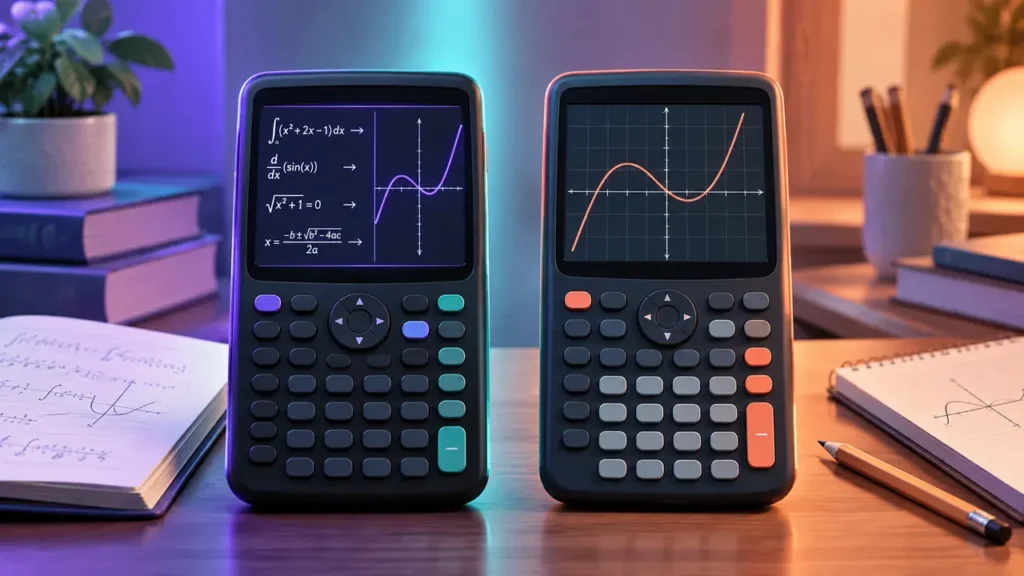
Enter a derivative such as d/dx(x³) into two calculators and you may get very different kinds of answers. A calculator with a Computer Algebra System (CAS) can work with the expression symbolically and return 3x². A non-CAS calculator with numerical differentiation may instead evaluate the derivative at a specified point, giving 12 when x = 2. Both results are mathematically useful, but they answer different questions.
That distinction is at the center of CAS vs Non-CAS Calculator. CAS refers to a system that can perform supported symbolic operations on mathematical expressions containing variables. A non-CAS calculator does not provide that general symbolic manipulation system, but it may still offer graphing, equation solving, statistics, matrices, exact arithmetic, programming, and numerical calculus depending on the model.
CAS should therefore be treated as one mathematical capability rather than a measure of how advanced a calculator is overall. The practical question is whether the calculator itself needs to manipulate expressions symbolically or whether numerical, graphical, statistical, and other non-CAS tools cover the work you need to do.
Quick Answer
CAS is relevant when you need the calculator to manipulate mathematical expressions symbolically. Depending on the system and operation, this can include factoring expressions, simplifying algebra, solving equations symbolically, differentiating functions symbolically, and finding symbolic antiderivatives.
A non-CAS calculator can still handle substantial mathematics. Depending on the exact model, it may graph functions, generate tables, solve equations numerically, work with matrices and statistics, evaluate numerical derivatives and definite integrals, run programs, or support calculator-side Python.
The distinction is not CAS versus “basic.” It is general symbolic manipulation versus a calculator environment without that general symbolic system. Course requirements and current exam policies should be checked separately because mathematical capability does not determine where a calculator is permitted.
CAS vs Non-CAS Calculator: Comparison Table
| Capability | CAS Calculator | Non-CAS Calculator |
|---|---|---|
| General symbolic manipulation | Can perform supported symbolic operations on expressions containing variables | Does not provide a general CAS environment |
| Differentiate x³ | Can return a symbolic expression such as 3x² | Some models can evaluate the derivative numerically at a specified x-value |
| Integrate x² | Can return a symbolic antiderivative such as x³/3, where supported | Some models can numerically evaluate a definite integral over specified bounds |
| Solve equations | Can perform supported symbolic equation solving, including solutions that may contain other variables | May provide numerical, polynomial, simultaneous-equation, or graph-based solvers depending on the model |
| Exact results | Often works with exact symbolic forms where supported | Some models can return exact fractions, radicals, or other exact results without being CAS |
| Graphing | Depends on the calculator | Depends on the calculator; many graphing calculators are non-CAS |
| Numerical calculus | May provide numerical tools in addition to symbolic calculus | Available on many advanced models without CAS |
| Programming | Depends on the model | Depends on the model; programming does not require CAS |
| Python | Model-dependent and separate from CAS | Available on some non-CAS calculators |
| Exam eligibility | Depends on the exact exam and current policy; CAS may be prohibited | Still depends on the exact model and current exam policy |
What CAS Actually Means
CAS stands for Computer Algebra System. The defining idea is not simply that the calculator understands the letter x. Graphing calculators, scientific calculators, and even basic programming environments can store variables or evaluate functions containing variable names without providing CAS.
The important distinction is symbolic manipulation.
Consider the expression:
x² − 1
A calculator can evaluate that expression at x = 3 and return 8 without performing symbolic algebra. A graphing calculator can plot y = x² − 1 without performing symbolic algebra.
A CAS can go further and perform supported transformations on the expression itself, such as factoring:
x² − 1 → (x − 1)(x + 1)
The variable remains part of the mathematical object being manipulated. That is much closer to the defining purpose of CAS than simply asking whether a calculator can accept a variable.
Variables Alone Do Not Make a Calculation CAS
Non-CAS graphing calculators routinely work with variables. You may enter a function such as y = x² − 4, generate a table of values, draw its graph, trace points along the curve, or use a numerical tool to investigate its zeros.
None of those operations automatically requires general symbolic manipulation.
Similarly, storing a value in a variable does not imply CAS. A calculator might store 5 as A, evaluate 2A + 3, and return 13. That is variable storage and numerical evaluation rather than symbolic algebra.
The useful question is therefore not “Can this calculator use letters?” but “Can this calculator manipulate supported mathematical expressions symbolically?”
Symbolic and Numerical Differentiation Answer Different Questions
Differentiation provides one of the clearest examples of the CAS distinction.
Suppose:
f(x) = x³
A CAS can symbolically differentiate the function and return:
f′(x) = 3x²
The result remains a function of x. You can then use it at any supported value of the variable.
A non-CAS calculator with numerical differentiation can answer a different question. Ask for the derivative at x = 2 and it may return:
f′(2) = 12
The first result describes the derivative function. The second evaluates the derivative at a particular point.
Numerical differentiation is therefore not an inferior version of symbolic differentiation. It is a different operation suited to a different question.
Symbolic and Numerical Integration Are Also Different
The same distinction appears with integration.
Given:
∫x² dx
a CAS may return a symbolic antiderivative equivalent to:
x³/3
For an indefinite integral written as a general family of antiderivatives, the mathematical result includes the constant of integration:
x³/3 + C
A non-CAS calculator with numerical integration might instead evaluate:
∫₀¹ x² dx
and return a numerical result at or near:
0.333333…
That numerical value answers a definite-integral question over specified bounds. It is not a symbolic antiderivative.
A calculator can therefore be useful for calculus without having CAS.
Symbolic and Numerical Equation Solving Are Not the Same
Equation solvers are another common source of confusion because the word “solve” does not tell you how the calculator obtains or represents the answer.
Consider:
ax + b = 0
A symbolic solver can manipulate the equation and, under appropriate conditions, express the solution as:
x = −b/a
with the relevant restriction that a cannot be zero for that rearrangement.
A numerical solver can instead take an equation with specified numerical values and search for a value of the unknown that satisfies it. A graphing calculator can also identify a solution numerically by finding where appropriate graphs intersect.
Those tools can be extremely useful without being general symbolic solvers.
The presence of an Equation Solver menu or command therefore does not by itself prove that a calculator has CAS.
Exact Results Are Not the Same as CAS
A calculator does not become CAS simply because it returns an exact-looking answer.
Consider these three forms of output:
- Approximate numerical result: 0.333333…
- Exact numerical result: 1/3
- Symbolic manipulation: factor(x² − 1) → (x − 1)(x + 1)
The first two can both describe a number. The third transforms an algebraic expression containing a variable.
Some non-CAS calculators can preserve fractions, radicals, multiples of π, or other exact forms for supported calculations. They may also return exact solutions for certain structured problems.
Those capabilities can be valuable, but they should not automatically be labeled CAS. General symbolic manipulation is the more important distinction.
Textbook-Style Display Is Not CAS
Modern calculators often display mathematics in a format that resembles printed notation. Fractions may appear vertically, exponents may be raised, and radicals may look similar to the way they appear in a textbook.
That is a display and input feature, not evidence of a Computer Algebra System.
A calculator may display:
√2
or:
π/3
without being able to perform general symbolic operations such as factoring arbitrary supported expressions or differentiating a function symbolically.
Natural textbook display, exact arithmetic, and CAS should therefore be treated as separate capabilities.
Graphing Is Not CAS
Graphing and CAS are also independent concepts.
A non-CAS graphing calculator can plot curves, generate tables, trace functions, and use numerical graph-analysis tools to locate features such as zeros and intersections.
For example, suppose two equations intersect at a particular point. A graphing calculator may calculate or approximate that intersection numerically without rearranging the equations symbolically.
Conversely, CAS describes symbolic mathematics rather than the physical characteristics of a calculator. It says nothing by itself about screen size, display resolution, color, touch input, battery type, or graphing interface.
This is why graphing calculator and CAS calculator should never be treated as interchangeable labels.
Programming and Python Are Not CAS
A programmable calculator is not automatically a CAS calculator.
Programming allows users to create or run procedures within whatever programming environment the calculator provides. A program might perform repeated calculations, process data, implement an algorithm, or automate a numerical formula without providing general symbolic algebra.
Python support does not change that distinction. Some non-CAS graphing calculators provide calculator-side Python or MicroPython environments while remaining non-CAS.
Likewise, a CAS calculator may also be programmable, but the programming environment and the CAS are separate capabilities.
The following features therefore do not, by themselves, establish that a calculator has CAS:
- Graphing
- An equation solver
- Numerical derivatives
- Numerical integration
- Exact fractions or radicals
- Textbook-style mathematical notation
- Matrices
- Programming
- Python or MicroPython
- A large or color display
Non-CAS Does Not Mean Basic
A sophisticated calculator can remain completely non-CAS.
Depending on the model, a non-CAS graphing calculator may provide color graphing, function tables, statistics, regression, matrices, vectors, complex-number calculations, numerical equation solving, numerical derivatives, definite integrals, sequences, probability distributions, programming, calculator-side Python, and even 3D graphing.
None of those features necessarily adds general symbolic manipulation.
This makes “CAS vs non-CAS” very different from a ranking such as advanced versus basic. It identifies one particular mathematical distinction within a much larger set of calculator capabilities.
CAS Still Has Mathematical Boundaries
Having CAS does not mean that every mathematical expression will produce a simple symbolic answer without qualifications.
Domains and assumptions matter. For real x:
√(x²) = |x|
rather than simply x for every real value.
Symbolic solutions can also depend on restrictions, parameter assumptions, branch choices, and the domain in which the problem is being interpreted. Some expressions may not simplify into the form a user expects, and some symbolic operations may remain unevaluated or require additional assumptions.
A CAS result should therefore still be interpreted mathematically. Symbolic automation does not eliminate the need to understand domains, restrictions, or the meaning of the returned expression.
Representative CAS and Non-CAS Graphing Calculators
The TI-Nspire CX II and TI-Nspire CX II CAS provide a useful example because they belong to closely related calculator platforms while differing in the defining capability discussed here.
The TI-Nspire CX II is a non-CAS graphing calculator. It can perform substantial numerical and graphical mathematics without providing the general CAS functionality of the CAS version.
The TI-Nspire CX II CAS adds a Computer Algebra System, allowing supported symbolic operations that distinguish it mathematically from the standard non-CAS model.
Other examples reinforce the same point. The TI-84 Plus CE and Casio fx-CG50 are examples of graphing calculators that do not provide general CAS. The HP Prime is an example of a graphing calculator with CAS.
These examples show why “CAS vs non-CAS” should not be confused with “graphing vs non-graphing.” Both sides of the CAS distinction can include sophisticated graphing calculators.
Course Requirements Can Favor Either Workflow
Whether CAS is useful in a course depends partly on what students are expected to do themselves and how calculators are incorporated into instruction.
A course may expect students to perform symbolic algebra or calculus by hand while using a calculator for graphing, numerical checking, or data analysis. In that environment, a non-CAS graphing calculator can provide substantial support without performing the symbolic step for the student.
Another course may explicitly permit CAS and use symbolic calculator tools as part of the workflow. In that case, learning how the system represents assumptions, exact results, symbolic transformations, and numerical approximations can become part of using the calculator effectively.
The course syllabus and instructor requirements are therefore more useful than assuming that additional symbolic capability is always necessary.
Exam Rules Can Treat CAS as a Separate Restriction
Exam eligibility is independent of how useful a calculator may be for ordinary coursework. An assessment can permit graphing calculators while prohibiting CAS functionality.
This is an important distinction because a calculator can satisfy the mathematical definition of a graphing calculator and still be prohibited specifically because it includes CAS.
Likewise, being non-CAS does not automatically make a calculator acceptable. Exams can impose additional restrictions involving model families, programs, stored documents, communication features, keyboards, or other characteristics.
Always check the current policy published by the administrator of the exact assessment rather than relying on the general labels “CAS,” “non-CAS,” or “graphing calculator.”
SAT Currently Prohibits CAS Functionality
Under the current SAT Suite calculator policy, calculators with CAS functionality are not permitted. The updated policy took effect in August 2025 and covers built-in CAS as well as apps, menus, or programs that perform symbolic algebra.
This means that the distinction between CAS and non-CAS has a direct practical consequence for students choosing a physical calculator for the SAT. A graphing calculator is not automatically prohibited merely because it graphs, but CAS functionality is a specific restriction under the current policy.
The policy also includes restrictions beyond CAS, so students should verify the exact calculator rather than assuming that every non-CAS model is permitted.
ACT Also Separates CAS From Ordinary Graphing Capability
The current ACT calculator policy permits 4-function, scientific, and graphing calculators unless a model or feature falls under its prohibitions. Calculators with built-in or downloaded CAS functionality are prohibited.
This creates a useful real-world example of the distinction. A non-CAS graphing calculator can be permitted even though a related CAS model is prohibited. ACT currently identifies the non-CAS TI-Nspire as permitted while listing TI-Nspire CAS models among prohibited calculators.
ACT also imposes requirements involving programs, documents, device types, and other calculator characteristics. CAS status is therefore important, but it is not the only part of calculator eligibility.
Exam Mode Does Not Automatically Make a CAS Calculator Permitted
Some calculators provide test or exam modes that disable selected functions. The existence of such a mode does not independently establish eligibility for a particular assessment.
An exam administrator may prohibit a calculator based on its built-in capabilities or model family even when some features can be disabled. Another assessment may have different rules.
Always follow the administrator’s current policy rather than assuming that activating an exam mode converts a prohibited calculator into an approved one.
Which Capability Fits the Work?
The most useful way to approach the distinction is to start with the form of mathematics the calculator needs to perform.
- If the calculator needs to manipulate expressions symbolically, such as factoring variable expressions or producing symbolic derivatives, CAS is the relevant capability.
- If you need graphs and numerical graph analysis without general symbolic algebra, a non-CAS graphing calculator may provide the required tools.
- If you need numerical derivatives or definite integrals, CAS may not be necessary; check whether the exact non-CAS model provides the required numerical calculus functions.
- If you need exact fractions or radicals, do not assume CAS is required. Some non-CAS calculators provide exact results for supported calculations.
- If you need programming or Python, check those capabilities separately. Neither one establishes CAS.
- If the calculator will be used for a course or exam, check the exact permitted models and features before treating additional symbolic capability as an advantage.
Frequently Asked Questions
What does CAS mean on a calculator?
CAS stands for Computer Algebra System. It refers to a system capable of performing supported symbolic mathematical operations, such as manipulating algebraic expressions, solving equations symbolically, or performing symbolic calculus. The exact capabilities depend on the particular CAS.
Can a non-CAS calculator use variables?
Yes. Non-CAS calculators can store variables, evaluate expressions containing variables, graph functions, and use variables in programs or other model-specific tools. Using variables is not the defining feature of CAS. General symbolic manipulation is the more important distinction.
Can a non-CAS calculator give exact answers?
Yes, some can. A non-CAS calculator may return exact fractions, radicals, multiples of π, or other exact forms for supported calculations. Exact arithmetic and general symbolic manipulation are related concepts in some systems but are not the same capability.
Can a non-CAS calculator do calculus?
Yes. Some non-CAS models provide numerical derivatives and definite integrals. These tools can evaluate a derivative at a specified point or calculate an integral over specified bounds without producing a general symbolic derivative or antiderivative.
Does an equation solver mean a calculator has CAS?
No. A numerical solver can find a value that satisfies an equation without manipulating the equation symbolically. Polynomial solvers, simultaneous-equation solvers, and graph-based solutions can also exist on non-CAS calculators.
Is every graphing calculator a CAS calculator?
No. Many graphing calculators are non-CAS. Graphing refers to plotting mathematical relationships on a display, while CAS refers to symbolic mathematical manipulation. The two capabilities should be checked separately.
Is every CAS calculator a graphing calculator?
No. CAS describes symbolic mathematical capability rather than graphing capability. A particular calculator or software system may provide both, but one does not logically require the other.
Does Python make a calculator CAS?
No. Python support and CAS are separate features. A calculator can provide a Python or MicroPython environment while remaining non-CAS. Programming capability alone does not establish general symbolic algebra.
Does textbook-style math display mean CAS?
No. A calculator can display fractions, exponents, radicals, and other expressions in textbook-style notation without providing general symbolic manipulation. Display format should not be used to identify CAS capability.
Is a CAS calculator better than a non-CAS calculator?
CAS adds a particular class of symbolic capabilities, but it does not determine a calculator’s overall suitability for a task. A non-CAS calculator may provide graphing, statistics, matrices, numerical calculus, programming, Python, or other tools that matter more for a particular course or workflow.
Can I use a CAS calculator on the SAT?
Under the current SAT Suite calculator policy, calculators with CAS functionality are not permitted. The policy also contains restrictions beyond CAS, so verify the exact calculator against the current College Board rules before test day.
Can I use a CAS calculator on the ACT?
The current ACT calculator policy prohibits calculators with built-in or downloaded CAS functionality. ACT permits many non-CAS scientific and graphing calculators subject to its other restrictions, so the exact model and configuration still need to be checked.
Final Verdict
The defining difference between CAS and non-CAS calculators is general symbolic manipulation. A CAS can perform supported operations on mathematical expressions while variables remain symbolic, such as factoring an expression or producing a symbolic derivative. A non-CAS calculator lacks that general symbolic system but may still provide exact arithmetic, graphing, statistics, matrices, equation solving, numerical calculus, programming, Python, and other advanced capabilities.
CAS is therefore not a synonym for graphing, programming, exact answers, or an advanced calculator in general. Start with the mathematical output you need. If the calculator itself must manipulate expressions symbolically, CAS is the capability to examine. If the required work is numerical, graphical, statistical, or otherwise supported without general symbolic manipulation, a non-CAS model may provide the necessary tools. For classroom and assessment use, make the final model choice against the current course requirements and official exam policy rather than CAS status alone.