TI-Nspire CX II Review: Features, Capabilities, and Limitations
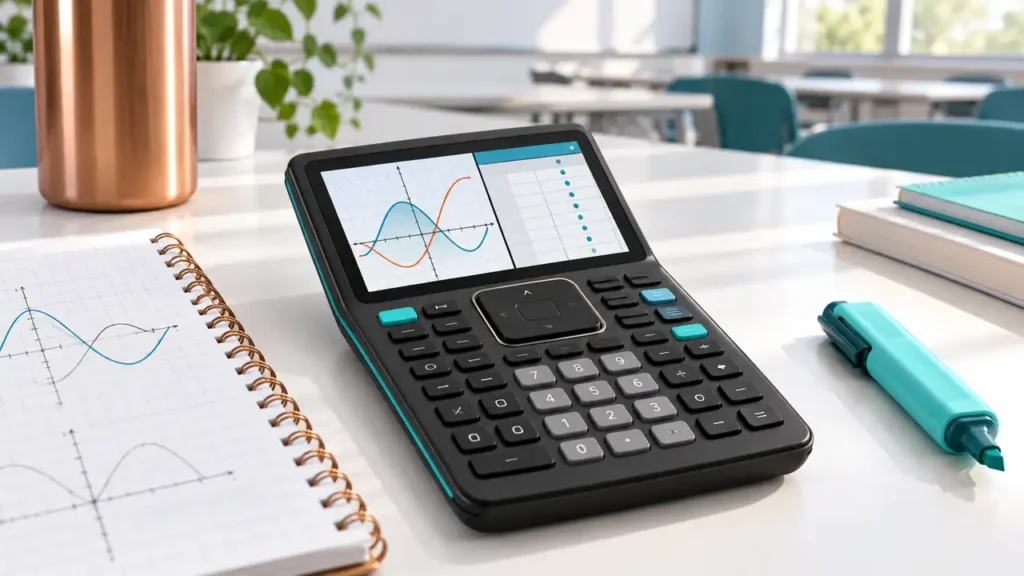
The TI-Nspire CX II is a color graphing calculator built around linked documents and multiple mathematical views. It can connect algebraic expressions with graphs, tables, geometry, statistics, and written notes inside a TI-Nspire document. This makes it structurally different from a traditional TI-84 calculator. The standard CX II is non-CAS: it can work numerically, but it does not provide the exact symbolic manipulation of the separate TI-Nspire CX II CAS.
Quick Answer
The TI-Nspire CX II is worth considering when lessons use TI-Nspire documents, when linked representations and 3D graphing matter, or when a student wants a rechargeable color device with both Python and TI-Basic programming. It has a deeper, document-oriented workflow than a conventional graphing calculator, so check whether the course teaches it. The standard CX II is not a symbolic algebra calculator; a fraction display or an exact-looking numeric result does not mean the unit has CAS. Its non-CAS model is permitted under current SAT and ACT calculator rules, subject to each exam’s general restrictions.
| Area | TI-Nspire CX II |
|---|---|
| Screen | 3.2-inch diagonal, backlit color, 320 × 240, 16-bit |
| Memory | 90+ MB user storage and 64 MB operating memory (TI’s separate categories) |
| Power and connection | Rechargeable battery; USB connection for computer and charging |
| Graphing | 2D function, parametric, polar, sequence, and 3D graphing |
| Analysis | Numerical roots, extrema, integrals, derivatives; statistics and matrices |
| Algebra | Non-CAS Numeric Math mode; no Exact Arithmetic mode |
| Programming | Python and TI-Basic |

To buy this product, click here.
What makes the TI-Nspire workflow different
The TI-Nspire environment organizes work in documents rather than treating every calculation as an isolated calculator screen. A document can contain pages with a Calculator, Graphs, Geometry, Lists & Spreadsheet, Data & Statistics, or Notes application. A student can enter an expression in one view and examine its graph or table in another, keeping related representations together. This document structure can make a multi-step classroom exploration easier to revisit, but it also means a first-time user has more menus and document concepts to learn than with a single-screen TI-84 workflow. TI’s TI-Nspire CX II guidebook offers step-by-step detail on document pages and apps.
TI-Nspire documents use the .tns format and can combine mathematical pages. Teachers can distribute files for guided activities, and students can save their own explorations. The benefit depends on the course: if a class actively uses linked pages and teacher-provided files, the architecture can support the lesson. If the course only expects a few familiar key sequences, much of the document capability may not affect daily work. Check computer software and file compatibility separately; calculator hardware alone does not guarantee that every classroom file or software version is available.
Graphing, tables, and 3D visualization
The CX II handles standard function graphing alongside parametric, polar, and sequence plots, as well as 3D graphs. The Graphs application lets users work with functions, tables, and numerical analysis in a visual context. TI documents operations such as finding roots, maximums and minimums, definite integrals, and derivatives. These are numerical tools; they help inspect a graph and approximate values rather than produce general symbolic calculus expressions.
Three-dimensional plotting is useful for visualizing surfaces and other spatial relationships that a standard 2D graph window cannot show. It is an extension of the graphing workflow, not a replacement for learning multivariable calculus or interpreting the graph. The backlit 320 × 240 screen provides color and more visual area than older monochrome TI models, while remaining a calculator display with keypad navigation.
Math modes: numerical is not symbolic
The standard CX II has Numeric Math mode. TI’s mode documentation distinguishes it from the CAS calculator’s Exact Arithmetic and CAS modes. In numeric mode, calculations use numeric values, including decimal and fraction-style display options; those display forms should not be confused with a computer algebra system. The non-CAS calculator does not generally factor expressions symbolically, solve equations exactly in the CAS sense, compute limits symbolically, or return indefinite integrals as formulas.
This matters when a syllabus asks for algebraic reasoning, exact forms, or symbolic manipulation. The CX II can graph an expression and compute numerical results that help check work, but the student may still need to do the algebra by hand or use an approved CAS elsewhere. If symbolic output is necessary, compare the TI-Nspire CX II CAS and then verify exam restrictions before choosing it.
Programming, memory, and connectivity
TI lists Python and TI-Basic programming for the CX II. Python can support calculator-based coding activities, while TI-Basic allows familiar TI programs. The calculator is still not a laptop Python environment: screen size, available libraries, input methods, and the calculator’s programming environment shape what is practical. If a course depends on a particular library, syntax feature, or file transfer, check TI’s current documentation before assuming compatibility.
TI specifies 90+ MB of storage and 64 MB of operating memory as different quantities. Storage is for documents and user files; operating memory describes a separate system resource. These figures should not be merged or treated as equivalent to an app’s available workspace. TI’s rechargeable battery and USB connection support classroom use and computer transfer. Confirm the supplied cable, compatible desktop software, and current operating-system requirements for the exact package and machine.
Examples of a TI-Nspire document workflow
A function investigation can begin on a Graphs page, add a table for selected input values, and retain explanatory notes in the same document. A statistics activity can organize raw observations in Lists & Spreadsheet and then examine a plot or regression on a related page. A geometry task can keep a construction and its measurements with the student’s written observations. These examples illustrate why the format can matter: the document is a reusable record of related representations, not simply a single result saved to memory.
That structure also creates a practical dependency. A student who receives .tns documents should confirm how files are created, transferred, and backed up, and whether the computer software needed for the class is compatible with the student’s computer. The calculator can be used without every desktop feature, but classroom work may expect a file-transfer step. Keep a separate backup when a course relies on documents and verify that the files open on the exact CX II software version.
Memory and files in day-to-day use
The published 90+ MB user-storage figure and 64 MB operating-memory figure are useful only when read as separate categories. Documents are stored as files, while the calculator’s operating system and active apps have different needs. A large storage figure does not guarantee that any given program or classroom activity will work; confirm its model, operating-system, and transfer requirements.
A document workflow can also change how students study: rather than copying a single answer, they can save a graph, data table, and explanatory note together. That is helpful only if files are named, organized, and backed up. A clear naming convention for course, unit, and assignment can prevent a collection of similarly named .tns files from becoming difficult to distinguish later.
Choosing the CX II over another non-CAS model
Compared with the TI-84 Plus CE, the CX II places more emphasis on documents, app pages, and linking representations. The CE uses a more traditional TI-84 workflow, which may be preferable when a teacher demonstrates Y=, WINDOW, and familiar TI-84 menus. Compared with a Casio fx-CG50, the CX II provides a document-centered environment and its own 3D tools, while the Casio uses Casio apps and supported graph types. Both are non-CAS, but their data and programming workflows differ.
There is little reason to buy the more complex platform if the course never uses its document features and does not need 3D graphing. Conversely, if a teacher provides Nspire files and expects linked views, a simpler model may require students to recreate that context manually. Ask which model names appear in the syllabus, what files are distributed, and whether the course uses Python before deciding.
Who should choose CX II rather than CX II CAS?
The CX II is the more appropriate of the two when a course needs the TI-Nspire document environment, programming, graphs, and numerical tools but does not need symbolic algebra. Its non-CAS math mode is a critical part of the model identity. The CX II CAS adds symbolic capability, which can be valuable in advanced mathematics but changes exam eligibility: current SAT and ACT rules prohibit the CAS model even when a user intends to stay out of CAS mode.
On the other hand, if the course requires exact symbolic factorization or expression solving, the standard CX II may not meet that requirement. A CAS feature set is not automatically better for every student: a teacher or exam may specifically require or prohibit it. Decide from the work expected in class and the test rules, not just the shared “CX II” name.
Exam policy
The current College Board SAT calculator policy permits graphing calculators that do not have prohibited CAS capability, while imposing rules on algebra-enabled programs, stored documents, and other material. The ACT calculator policy explicitly distinguishes TI-Nspire CX II non-CAS models from TI-Nspire CAS models and also restricts stored programs or documents with CAS functionality. The CX II non-CAS version is the relevant one here; do not substitute a CAS device based on visual similarity.
For AP, rules vary by subject and year. The AP calculator policy includes TI-Nspire models for eligible exams, but 2027 AP Biology and AP Environmental Science policies prohibit handheld graphing calculators with storage. AP Statistics also has a separate 2027 change involving non-graphing calculators. Confirm the precise exam page and follow any proctor instructions regarding memory or stored documents.
Limitations to weigh
- Learning overhead: documents, pages, and application switching create a richer but more involved workflow than a traditional one-screen graphing calculator.
- No general CAS: numerical graph analysis is not symbolic algebra.
- Course dependence: files and classroom directions often assume a particular TI-Nspire app, document, or software version.
- Exam distinction: the CX II and CX II CAS have materially different SAT/ACT eligibility.
- Display remains compact: color and 3D graphing do not turn the unit into a tablet or general computer.
Who is it for?
Good fit: a student whose course uses TI-Nspire documents; someone who wants linked graphs, tables, geometry, and notes; a user who needs 3D graphing and calculator-side Python but not CAS; or a test taker seeking a non-CAS TI-Nspire and prepared to follow current restrictions.
Consider another calculator: users whose teachers teach TI-84 button sequences, anyone who needs exact CAS algebra, or a buyer who will not use the document workflow. A TI-84 Plus CE is simpler for established TI-84 lessons. The CX II CAS adds symbolic math but is barred by current SAT and ACT policies. Casio’s fx-CG50 has color and limited specific 3D graph modes without general CAS, but has a different menu and file ecosystem.
Frequently asked questions
Does the TI-Nspire CX II have CAS?
No. The standard CX II operates in Numeric Math mode; CAS and Exact Arithmetic modes belong to the separate CAS model.
Can it do 3D graphing?
Yes. TI lists 3D graphing among the CX II capabilities.
Does it have Python?
Yes, TI lists Python programming and TI-Basic. Check TI’s current guide for supported functionality and file-transfer requirements.
Can it calculate a derivative or integral?
It can compute numerical derivative and definite-integral results. It does not provide the general symbolic calculus of the CX II CAS.
Is it allowed on the SAT and ACT?
The standard non-CAS CX II is treated differently from the CAS edition. Review the current SAT and ACT rules, including program and document restrictions, before test day.
What is the difference between its storage and operating memory?
TI lists 90+ MB storage and 64 MB operating memory separately. They describe different roles and should not be combined into one “available memory” figure.
Can I use TI-84 programs on it?
Do not assume direct compatibility. Verify the program’s model support and the course’s intended software or document format.
Is the CX II better than the CX II CAS?
Neither is universally better. The standard model is non-CAS and has broader SAT/ACT eligibility; the CAS edition adds symbolic mathematics but is prohibited by those current test policies.
For a wider shortlist beyond the TI-Nspire platform, see the site’s student-focused graphing calculator guide, which discusses the CX II alongside other course options.
Final verdict
The TI-Nspire CX II stands out for linked mathematical views, editable documents, 3D graphs, and programming while keeping a non-CAS math engine. It is an especially coherent choice when a teacher makes use of the document workflow. Its key limitation is not a lack of numerical tools but the absence of general symbolic algebra, and its richer structure can be unnecessary in a course built around another calculator. Verify the model suffix, course compatibility, and exam rules; the distinction between CX II and CX II CAS materially changes what the calculator can do and where it may be used.