HP Prime Review: Features, Capabilities, and Limitations
The HP Prime is a color graphing calculator with a touchscreen interface, dedicated math applications, 2D and 3D graphing, and a computer algebra system. Its CAS and non-CAS mathematical views let users work with both symbolic and numerical methods. It is a powerful fit for advanced coursework that permits CAS, but its symbolic engine makes it prohibited on current SAT and ACT calculator policies—even if the user intends to stay in the non-CAS view. HP Prime model identifiers and support materials can be product-number-specific, so verify the exact hardware and software version before relying on a specification. The Amazon product verified for this review is the HP Prime G2; compare its product number and OS with any different revision.
Quick Answer
Consider HP Prime when you need symbolic algebra and calculus, 3D graphing, statistics, geometry, or an advanced application environment in a handheld calculator. The touch-enabled color screen and CAS views support a broad range of mathematical work. The most significant drawback is exam eligibility: the current SAT and ACT rules prohibit HP Prime because it has CAS. It is also more capable and menu-rich than many introductory courses require. Check the exact unit’s HP product number, operating system, accessories, and course rules before purchasing.
| Area | HP Prime documented capabilities |
|---|---|
| Display | 3.5-inch, 320 × 240, 16-bit color touchscreen with multitouch |
| Hardware figures | HP support materials list 32 MB mDDR, 256 MB flash, and a 400 MHz ARM9 for the cited product entry |
| Power / connection | Rechargeable lithium-ion battery; USB connection |
| Math environment | Separate Home, CAS, and application-oriented views |
| Graphs | 2D and 3D graphing, tables, geometry and statistics applications |
| Programming | HP PPL calculator programming; no built-in Python environment documented |
| Exam distinction | CAS calculator; prohibited by current SAT and ACT policies |
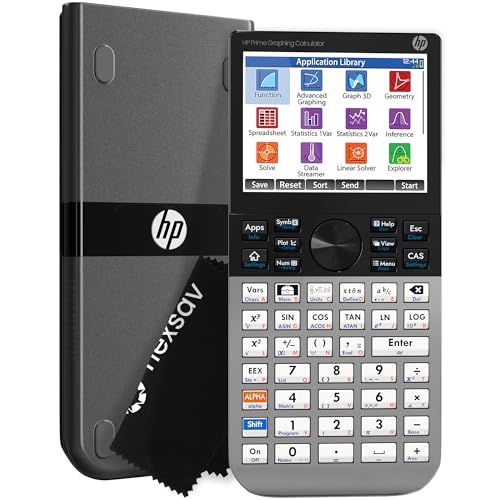
To buy this product, click here.
CAS and numerical work in one calculator
The HP Prime’s defining mathematical feature is its computer algebra system. HP documents separate Home and CAS contexts and a range of symbolic operations. The CAS can manipulate expressions, solve equations, simplify forms, work with limits and calculus, and preserve exact values where the selected operation supports them. This can be valuable in algebra, precalculus, calculus, and higher-level problems where a user wants to explore how expressions relate as well as compute a numerical result.
Symbolic output is not a substitute for interpreting the problem. The domain, assumptions, units, and meaning of multiple solutions still matter. A calculator can return an equivalent expression in a form different from the one expected in a lesson, and a CAS result does not itself demonstrate a proof or required manual method. Students should use CAS according to the instructor’s rules and show the reasoning requested in submitted work.
The Home view provides a conventional numeric environment, while CAS supports exact symbolic operations. Users can select the appropriate method for the task. This flexibility may be useful in a course that teaches both, but it does not change exam eligibility. A model equipped with CAS remains a CAS calculator even when the user chooses a numeric view.
Graphing, applications, and visualization
HP Prime offers 2D and 3D graphing alongside a set of built-in math applications. Its environments support graph plotting, tables, statistics, geometry, lists and spreadsheet work, and other mathematical tasks. The linked applications can keep data and views organized; they also create a deeper interface than a basic graphing calculator. Review the exact guide for the application and current operating-system version that your course uses.
The 3.5-inch color display is a 320 × 240 touchscreen with multitouch support. A touchscreen can make graph interaction and navigation different from calculators that rely only on physical keys, while dedicated keys remain part of the workflow. The screen is larger than many calculator panels but is still small enough that dense formulas, long tables, and 3D scenes must be viewed within a handheld area. Visualization helps inspect a relationship; it should be interpreted with window settings, scale, and domain in mind.
Hardware specifications and revision awareness
HP’s support listing for one Prime product entry specifies 32 MB of mDDR, 256 MB of flash, a 400 MHz ARM9, and a rechargeable lithium-ion battery. These are specifications attached to HP’s cited product number, not a universal guarantee about every package sold under a broad “HP Prime” title. Sellers can use regional descriptions, and support pages or datasheets may describe a specific hardware configuration. Check the model and product number printed on the exact calculator and compare it with the documentation before relying on a revision-sensitive claim. For exact product-number details, check HP Prime product support specifications.
Memory figures describe different categories. Flash storage and mDDR are not interchangeable, and the available space for documents or programs may be lower than a headline hardware figure after system use. If your workflow depends on a file or application, confirm compatibility with the calculator’s current operating system and memory limits rather than inferring behavior from a storage total.
Programming and computer workflow
HP Prime supports programming through HP PPL, HP’s calculator-oriented programming language. Its product documentation does not list a built-in Python environment. Do not assume a Python script or library for another model will run on it. Check HP’s current programming guide for language syntax, file-transfer options, and OS compatibility before using it in a coding course.
The calculator uses a rechargeable lithium-ion battery and can connect to a computer over USB. Computer software and update support are separate from the built-in calculation features. Confirm the current HP software for the computer’s operating system, the included cable, and the calculator’s installed firmware. This is especially relevant when purchasing a package with unclear regional or used-unit details.
Who benefits from its range?
For a course that permits CAS and uses symbolic algebra, limits, or calculus, the HP Prime can consolidate tasks that would otherwise require separate numerical and symbolic tools. Students can move among calculation, graphing, and application contexts on one device. Advanced users may appreciate the breadth of the environment; an introductory course that only needs arithmetic and a few 2D plots may not use most of the available functions.
The range also creates policy and training trade-offs. A user may need to learn the Home/CAS distinction, choose an appropriate app, and follow a course’s restrictions on symbolic output. The HP Prime is a poor single-calculator choice for a student who must use the same device for SAT or ACT under current rules. If both advanced coursework and a CAS-prohibited exam are important, consult teachers and exam administrators about the calculator plan rather than expecting a mode toggle to solve the issue.
Exam rules: SAT, ACT, and AP
The current College Board SAT calculator policy prohibits CAS calculators and also covers algebra-enabled programs and stored documents. ACT’s calculator policy explicitly lists HP Prime among prohibited calculators. Selecting a non-CAS Home view does not remove the CAS capability from the model, so HP Prime should not be taken to either test under the current policies.
AP exam rules differ. The AP calculator policy lists HP Prime for relevant graphing-calculator exams, including applicable calculus use. It is not permitted or needed for every AP subject. In 2027, handheld graphing calculators with storage are prohibited for AP Biology and AP Environmental Science; AP Statistics also has a separate calculator change. Check the exact subject and date rather than generalizing from one AP approval.
CAS and graphing in typical advanced courses
In algebra, the CAS can compare equivalent expressions or solve a symbolic equation while preserving exact quantities. In calculus, it can assist with limits, derivatives, and antiderivatives; graphing can then show behavior over a selected interval. In statistics and geometry, built-in apps organize data and constructions alongside the calculator’s other views. These examples describe documented capabilities rather than test results: the user must still choose valid assumptions, identify excluded values, and explain the solution where a class asks for written reasoning.
For numerical tasks, a decimal approximation can be more useful than a long exact expression. For symbolic tasks, exact forms can make relationships visible that a decimal would obscure. The HP Prime’s range allows both approaches, but the student must know when each is appropriate and whether the assignment or testing context permits it. An instructor may allow CAS as a checking tool but still require hand-worked derivations.
Choosing the right view and mathematical method
The HP Prime lets a user approach a problem numerically or symbolically, but a course may favor one approach. Numeric work is practical for decimal approximations, graph inspection, and data; CAS is useful for exact transformations and symbolic calculus. Switching views does not remove the need to verify whether a denominator is zero, whether an equation has domain restrictions, or whether a numerical root satisfies the original equation.
For a long assignment, the application environment can keep a graph, table, data list, or geometry construction organized around the calculation. This breadth is useful when multiple applications are used together; it is less important for a course that needs only a few basic graphing operations. A student should practice the expected navigation and know how to show work without treating the calculator’s final result as a complete explanation.
Purchasing and revision checks
Before ordering, compare the product number in the listing with the HP support page and data sheet being used for specifications. Check the operating system version, included cable, rechargeable battery condition on a used device, touch display, and available computer software. Seller descriptions may omit the product number or bundle details. If hardware generation or revision matters to your course, request a clear photo of the model identifier and match it to HP’s own documentation.
For a used HP Prime, examine the touchscreen and physical keys, USB connector, battery charging behavior, and screen condition. Confirm that the CAS, apps, and firmware are present and that the device can be reset according to HP’s guide if you need a clean setup. This is a checklist for an individual unit, not a claim about the reliability of every used calculator.
Limitations and alternatives
- CAS bars SAT and ACT use: this remains true when CAS functions are not used.
- More capability than every class needs: the app structure and symbolic functions require learning and course alignment.
- Hardware details are product-specific: verify the number on the exact unit and compare HP’s matching support material.
- No built-in Python documented: HP PPL is the supported calculator programming path described in HP materials.
- Handheld screen constraints: touch input and color do not remove limits on viewing long expressions or dense graphs.
If you want a non-CAS TI-Nspire document workflow with color and 3D graphs, compare the TI-Nspire CX II. The TI-84 Plus CE is a more traditional non-CAS color calculator. The NumWorks Graphing Calculator has an app-based interface and MicroPython, though its exam acceptance should be confirmed with administrators. These alternatives do not reproduce the HP Prime’s CAS feature set.
Frequently asked questions
Does HP Prime have a CAS?
Yes. HP documents a CAS environment and symbolic operations.
Is HP Prime allowed on SAT or ACT?
No under current policies. College Board prohibits CAS calculators, and ACT explicitly lists HP Prime as prohibited.
Can it be used on AP Calculus?
The current AP policy lists HP Prime for relevant AP graphing-calculator exams. Verify the current policy and your exact exam instructions.
Does it have 3D graphing?
Yes. HP documentation lists 2D and 3D graphing capabilities.
Does it run Python?
HP’s documentation describes HP PPL programming; it does not document a built-in Python environment.
Is every HP Prime hardware version the same?
Do not assume that from the product name alone. Match the calculator’s product number and OS with HP’s corresponding specifications and manuals.
Does CAS replace written work?
That depends on the course. Follow instructor requirements for derivations, explanations, and acceptable calculator use.
Does the Home view make it non-CAS for an exam?
No. Eligibility is based on the calculator model’s capabilities, not on which view a student plans to use.
Final verdict
HP Prime is a feature-rich graphing calculator for users who can benefit from CAS, 3D graphs, and a broad suite of math applications. Its symbolic and numerical contexts, touchscreen, and programming tools make it a versatile course device where those features are permitted. The trade-off is substantial: current SAT and ACT policies prohibit the model, and its interface and support details deserve careful matching to the class and exact hardware. Choose it for a course that explicitly benefits from CAS and check the product number and exam calendar before purchase.