TI-84 Plus vs TI-84 Plus CE: Key Differences Explained
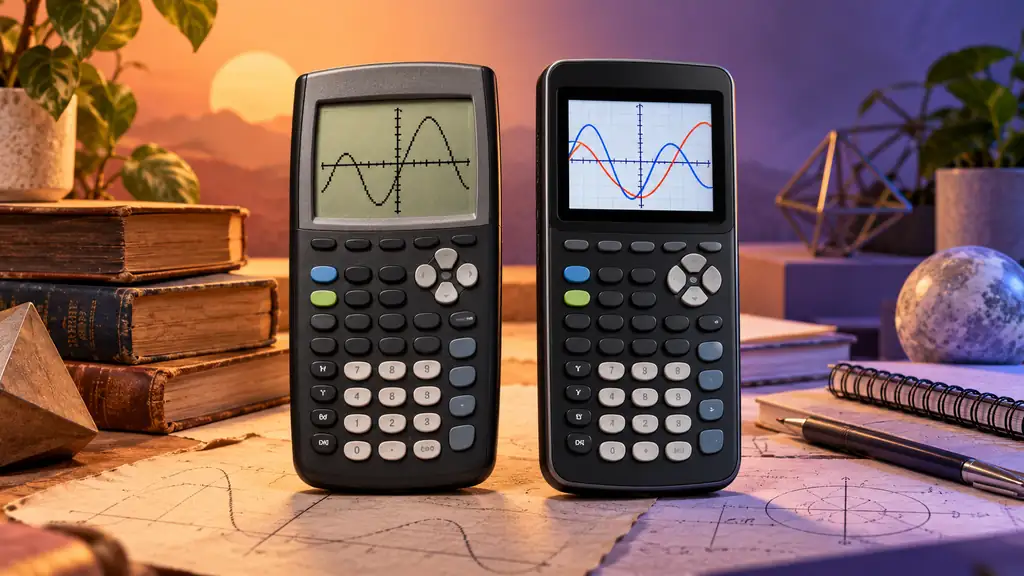
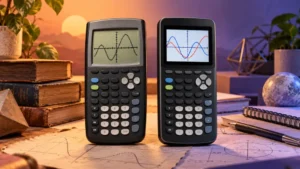
The TI-84 Plus and TI-84 Plus CE share a familiar TI graphing workflow, but the hardware experience is noticeably different. Graph several functions on a TI-84 Plus and you work with a monochrome display. Do the same on a TI-84 Plus CE and the backlit color screen can assign different colors to different functions, making multiple curves easier to distinguish.
The difference goes beyond color. The TI-84 Plus CE belongs to a newer hardware generation with a slimmer body, rechargeable battery, higher-resolution display, more memory, and greater speed than the TI-84 Plus. Their core mathematical capabilities still overlap substantially, however. Both handle graphing, tables, statistics, matrices, and numerical calculus, and neither standard model should be treated as a CAS calculator.
Quick Answer
Keep or choose the TI-84 Plus if its monochrome display meets your needs and you prefer a calculator powered by replaceable AAA batteries. Its core graphing, statistics, matrix, and numerical-calculus tools remain useful for many mathematics courses.
Choose the TI-84 Plus CE if you want a backlit 320 × 240 color display, a slimmer body, rechargeable power, more memory, and newer hardware while retaining a familiar TI-84-style workflow. TI describes the CE as providing more memory and more speed than the TI-84 Plus and as being 30% slimmer.
Python support requires an additional model check. TI-Basic is supported across the TI-84 Plus CE family, while Python is available on the TI-84 Plus CE Python Edition. Do not assume Python support solely from the words “TI-84 Plus CE” in a listing.
TI-84 Plus vs TI-84 Plus CE: Comparison Table
| Feature | TI-84 Plus | TI-84 Plus CE |
|---|---|---|
| Display | Monochrome LCD | Backlit, full-color display |
| Display resolution | Lower-resolution monochrome display | 320 × 240 pixels |
| Color | Monochrome | 16-bit color |
| Power | Four replaceable AAA batteries | Rechargeable battery |
| Physical design | Older, thicker TI-84 design | TI describes it as 30% slimmer than the TI-84 Plus |
| Memory and speed | Older TI-84 Plus hardware platform | TI specifies more memory and more speed than the TI-84 Plus |
| Graphing and tables | Supported | Supported, with color available to distinguish graphs |
| Numerical calculus | Supported | Supported |
| TI-Basic | Supported | Supported |
| Python | Not a Python calculator | Available on the TI-84 Plus CE Python Edition; check the exact variant |
| Computer algebra system (CAS) | No | No |
The Difference You Will Notice Most: The Display
The move from a monochrome screen to a backlit 320 × 240 color display changes how graphs are presented. When several functions appear on the same graph, the TI-84 Plus CE can use different colors to help distinguish one function from another. The standard TI-84 Plus instead relies on its monochrome graphing interface.
Color becomes particularly useful when several functions or plotted data sets share the screen. It does not, however, make an intercept or intersection mathematically more accurate. A displayed graph is a visual representation, and the calculator’s numerical graph-analysis tools should be used when you need a numerical coordinate rather than an estimate based only on the visible pixels.
The CE also uses a backlit display, while the TI-84 Plus uses an older monochrome screen. The improvement is therefore not simply cosmetic: the two calculators present mathematical information through substantially different display hardware.
Core Mathematics Remains Closely Related
The newer hardware does not turn the TI-84 Plus CE into a fundamentally different category of mathematical calculator. Both models support familiar TI graphing workflows, including entering functions, adjusting graph windows, using tables, analyzing graphs, working with lists and statistics, and performing numerical calculations.
Both also provide numerical calculus tools. A numerical derivative can evaluate a derivative at a specified point, but that is different from producing a symbolic derivative formula. A numerical definite integral similarly produces a numerical result over an interval rather than a general symbolic antiderivative.
Neither model provides a Computer Algebra System. The CE’s newer display, additional memory, and greater speed should therefore not be interpreted as symbolic-math capability. If a course specifically requires symbolic algebra, symbolic differentiation, symbolic integration, or other CAS functions, the distinction between these two TI-84 models does not solve that requirement.
Hardware, Memory, and Speed
The TI-84 Plus CE represents a more substantial hardware update than the similar names might suggest. TI describes the CE as having more memory and more speed than the TI-84 Plus. This makes the difference broader than simply replacing a monochrome screen with a color panel.
The CE also provides a higher-resolution display and a slimmer physical design. TI describes the model as 30% slimmer than the TI-84 Plus, which changes how much space it occupies in a bag or calculator case and how it feels as a portable device.
Those hardware improvements should still be kept separate from mathematical capability. Faster or newer hardware can improve the calculator experience without adding CAS. Likewise, additional memory does not mean that every mathematical function differs between the two models. Much of the familiar TI-84 workflow remains recognizable.
Battery Design Changes the Ownership Routine
The TI-84 Plus uses four replaceable AAA batteries. When the batteries run low, they can be replaced without waiting for the calculator to recharge. That arrangement may suit someone who prefers keeping spare batteries available rather than maintaining another rechargeable device.
The TI-84 Plus CE uses a rechargeable battery instead. Routine AAA replacement is therefore unnecessary, but the calculator needs to be charged. Which system is more convenient depends largely on how the calculator is used and stored.
The distinction is also useful when shopping for accessories. A cable associated with the CE should not automatically be assumed to serve the same purpose as connectivity accessories for an older TI-84 Plus, and USB connectivity should not be treated as proof that two calculators share the same battery system.
Programming: TI-Basic and Python Are Different Questions
Both calculator families support TI-Basic, so moving to the CE does not require abandoning the familiar TI programming environment. Small mathematical utilities, classroom programs, and other TI-Basic projects remain part of the platform.
Python needs to be treated separately. Python support depends on the exact TI-84 Plus CE variant. TI-Basic is supported across the CE family, while Python is available on the TI-84 Plus CE Python Edition.
That distinction matters when shopping because similar product names do not establish identical programming capabilities. If a class specifically requires calculator-side Python, verify the exact model designation rather than assuming that any calculator carrying the TI-84 Plus CE name provides Python.
TI-84 Plus: Where It Fits
The TI-84 Plus remains useful when its monochrome display, replaceable-battery design, and established TI workflow already meet the required coursework. It can handle core graphing, tables, statistics, matrices, and numerical calculus without requiring a move to a newer calculator simply for the sake of newer hardware.
Keeping a working TI-84 Plus can therefore make sense when a course does not depend on the CE’s color display or other hardware improvements. Its AAA battery system may also appeal to users who prefer replacing batteries rather than maintaining a rechargeable battery.
There is no verified Amazon listing for the exact TI-84 Plus among the products featured here, so similarly named products should not be substituted merely to create a purchase link. The TI-84 Plus, TI-84 Plus C Silver Edition, and TI-84 Plus CE belong to different product variants or generations even though their names share “TI-84 Plus.”
TI-84 Plus CE: Where It Fits
The CE’s advantages are easiest to see during graph-heavy work and regular day-to-day use. Its backlit color display can visually separate multiple functions, while its 320 × 240 resolution provides a substantially different screen from the older monochrome TI-84 Plus.
The CE also moves to rechargeable power and a slimmer body. TI describes it as 30% slimmer than the TI-84 Plus and specifies more memory and more speed than the older model. These changes make the CE a broader hardware update while preserving a recognizable TI graphing workflow.
Programming requirements deserve an exact model check. TI-Basic is part of the CE family, while Python is available on the TI-84 Plus CE Python Edition. If Python is required, confirm the precise variant rather than relying on a shortened product name in a listing.
For readers looking for the standard black TI-84 Plus CE represented by the verified Amazon listing used here:

To buy this product, click here.
Do You Need to Upgrade From a TI-84 Plus?
A working TI-84 Plus does not become mathematically inadequate simply because the CE has newer hardware. If the older calculator supports the functions required by your course and its monochrome display is not causing difficulty, replacing it may provide more convenience than new mathematical capability.
The upgrade becomes more meaningful when the hardware differences address something you actually use. A student who regularly compares several graphs can benefit from color separation. Someone who carries the calculator every day may appreciate the slimmer body, while another user may prefer rechargeable power over keeping AAA batteries available.
Memory and speed are additional differences recognized by TI, but they should not be confused with CAS capability. The CE remains a non-CAS calculator despite its newer hardware.
Course and Exam Considerations
For many algebra, precalculus, statistics, and calculus tasks, both calculators provide the familiar graphing and numerical tools associated with the TI-84 family. Classroom compatibility can nevertheless depend on more than raw mathematical capability. An instructor may demonstrate procedures using a particular model, operating system, or screen layout.
Programming requirements can create another distinction. If a course specifically uses Python, the exact CE variant matters. If it uses TI-Basic or conventional graphing functions, the relevant requirements may be different.
Standardized-test rules should always be checked separately. Calculator policies can change and may distinguish between calculator models, capabilities, applications, or exam sections. When purchasing specifically for the SAT, ACT, AP, IB, or another examination, verify the current policy published by the relevant exam administrator rather than relying on an old product listing or historical approval claim.
Which One Should You Choose?
- Choose or keep the TI-84 Plus if its monochrome graphing interface meets your needs, you prefer replaceable AAA batteries, and it already provides the mathematical functions required by your course.
- Choose the TI-84 Plus CE if you value a backlit color display, higher screen resolution, rechargeable power, a slimmer body, more memory, and newer hardware.
- Check the exact CE variant if Python is required. Python support should not be inferred from the TI-84 Plus CE family name alone.
- Choose neither as a CAS substitute if your work specifically requires symbolic algebra, symbolic derivatives, symbolic antiderivatives, or other computer-algebra functions.
- Check current course and exam requirements before purchasing when a particular calculator model or capability is required.
If you already own a working TI-84 Plus, the strongest reasons to move to the CE are its hardware improvements rather than an entirely different mathematical toolkit. If you are choosing between the two without already owning either one, the CE provides the newer display, power system, physical design, memory, and hardware platform while retaining a familiar TI-style workflow.
Frequently Asked Questions
What is the biggest difference between the TI-84 Plus and TI-84 Plus CE?
The most immediately visible difference is the display. The TI-84 Plus uses a monochrome screen, while the TI-84 Plus CE has a backlit 320 × 240 full-color display. The CE also uses a rechargeable battery, has a slimmer body, and is specified by TI as having more memory and more speed than the TI-84 Plus.
Can both calculators graph functions and find intersections?
Yes. Both support function graphing and numerical graph-analysis tools, including tools used to locate intersections. The CE’s color display can make multiple curves easier to distinguish, but color itself does not make a calculated intersection more mathematically accurate.
Does the TI-84 Plus CE have CAS?
No. The TI-84 Plus CE is a non-CAS graphing calculator. Its numerical solving and calculus functions should not be confused with symbolic algebra, symbolic differentiation, or symbolic integration.
Does every TI-84 Plus CE support Python?
Python support depends on the exact variant. TI-Basic is supported across the TI-84 Plus CE family, while Python is available on the TI-84 Plus CE Python Edition. If Python is required, verify the exact model designation before purchasing.
Does the TI-84 Plus CE use AAA batteries?
No. The TI-84 Plus CE uses a rechargeable battery. The standard TI-84 Plus uses four replaceable AAA batteries.
Is the TI-84 Plus CE color screen necessary for math class?
Not necessarily. Both calculators can perform many of the same core graphing and numerical tasks. Color becomes more useful when several graphs or plotted data sets appear together, while the older monochrome display may be sufficient for coursework that does not depend heavily on visual separation between multiple graphs.
Should I replace a working TI-84 Plus with a TI-84 Plus CE?
Not automatically. If the TI-84 Plus already meets your course requirements, moving to the CE primarily gives you newer hardware features such as a color display, rechargeable battery, slimmer body, additional memory, and greater speed. Whether those differences justify replacing a working calculator depends on how much they matter for your actual coursework and daily use.
Final Verdict
The TI-84 Plus and TI-84 Plus CE overlap substantially in core mathematical capability, but their hardware belongs to different generations. The TI-84 Plus retains the traditional monochrome TI experience and replaceable AAA batteries. The CE adds a backlit 320 × 240 color display, rechargeable power, a slimmer body, and hardware that TI describes as providing more memory and more speed.
Keep or choose the TI-84 Plus when its existing graphing and numerical tools meet your needs and you prefer its battery arrangement. Choose the TI-84 Plus CE when the newer display, rechargeable battery, slimmer design, additional memory, and newer hardware would improve how you use the calculator. The CE improves the hardware experience substantially, but it does not change the fundamental distinction between numerical graphing tools and a Computer Algebra System.